Best Product Backlog Templates to Use in 2026


We’ve all felt overwhelmed and disorganized at work. Many employees spend more than half their day doing busy work instead of their actual responsibilities.
One of the best ways to tackle disorganization is through effective backlog management.
Starting from scratch with backlog management can be quite overwhelming, but it doesn’t have to be. A product backlog template is a great way to get started. Backlog management tools can help you prioritize tasks properly, streamline workflows, and make sure that you’re focusing on the important stuff.
Here’s everything you need to know about product backlogs, including templates, examples, and tips to get the most out of them. It’s time for you and your team to take control of your workday.
TL;DR
- Feeling overwhelmed at work often comes from juggling too many tasks without clear priorities.
- A product backlog template can help you organize and prioritize what really matters.
- Visual tools like Kanban and Gantt boards make it easier to see your tasks and progress.
- Features like priority scoring and team collaboration keep everyone on the same page.
- Engineering backlogs are great for tracking bugs, while Agile backlogs adapt as projects evolve.
- Regularly clean up your backlog by pruning irrelevant tasks and archiving completed ones.
- Using prioritization methods like RICE and WSJF ensures you focus on the most valuable tasks first.
- With proper backlog management, you and your team can stay organized and productive.
What is a product backlog template?
A product backlog template is a handy tool for organizing and prioritizing tasks. It can be used to quickly and easily create backlogs for new projects.
For organizations, this template can provide a clear, structured way to manage work. Teams can see what’s pending, prioritize tasks based on importance or urgency, and allocate resources more efficiently. It’s a great way for everyone to know what’s happening and focus on the most critical tasks first.
What does a good product backlog look like?
An effective product backlog keeps tasks organized and prioritized. Teamhood enhances this process with several features:
- Prioritize tasks using the List view. Add custom fields to get all the information needed for prioritization in one place.
- Manage tasks visually with Kanban and Gantt boards. Switch between these views to choose the best format for your needs.
- Separate boards for backlog management and work tracking keep your process clear and focused. This avoids clutter and ensures each board serves its purpose.
- Use the formula field to calculate priority scores easily. Make calculations for techniques like RICE on the platform.
- Collaborate effortlessly with item details, comments, and mentions. Keep all relevant information accessible throughout the planning process.
With these features, Teamhood helps turn a basic list into an effective, dynamic product backlog.

What is an example of a product backlog?
Think of a team working on a new fitness app. Here’s how it will go:
Their product backlog includes an epic (large user story) like “User Health Tracking.” This can then be broken down into user stories such as “As a user, I want to log my daily workouts,” “As a user, I want to track my nutrition,” and “As a user, I want to set and monitor fitness goals.”
Each story includes a list of criteria and estimated effort. For instance, logging daily workouts might be prioritized higher because it’s crucial for user engagement, while tracking nutrition could come later. The team regularly reviews and updates the backlog, ensuring the most valuable features are delivered first based on feedback.
5 Product backlog templates for your team
1. Project backlog template
Project backlog is organized into three main stages: Initial, Execution, and Completion. Each stage contains a list of tasks or milestones with associated statuses, priorities, and assignees.

- Initial Stage includes tasks like “event schedule,” “agree on materials,” “prepare design,” and “develop guidelines.”
- Execution Stage contains the tasks “implement,” “test,” and “sign QA.”
- Completion Stage has a single task: “handover done.”
Each task is likely marked with its current status, indicating where it stands in the workflow, and is assigned to specific team members. The tasks may also be prioritized, guiding the team on which to tackle first.
2. Engineering backlog template
Think of an engineering backlog like a to-do list for companies. It’s where they store product ideas and suggestions and prioritize them. The engineering team adds to it, but other teams also log bugs and defects that need to be fixed.

A Kanban board might have two swimlanes, “Committed plans” and “Innovation theme,” to organize tasks within a project.
- Unprioritized backlog: This first column has two sections:
- New: Contains tasks like “Inventory decrease” and “Design guidelines.”
- Unsolved dependencies: Holds tasks that are blocked or waiting on something else.
- Prioritized backlog: The next column is divided by priority levels—P3, P2, and P1.
- P2: Includes tasks like “Assembly line in Montana.”
- P1: Features high-priority tasks like “Material testing lab.”
This setup helps you quickly identify tasks in the pipeline, their urgency, and what needs immediate attention.
3. Agile product backlog template

In real-world Agile, the product backlog is a dynamic list. It evolves as the product progresses. Each row in the backlog represents a feature, task, or improvement that is to be worked on in a future sprint. This template helps product owners, managers, and teams maintain a clear and prioritized list of work that needs to be done.
Drop-down menus standardize fields like story, sprint readiness, and priority. This makes it easy to filter, sort, and assign tasks in Agile. It prioritizes adaptability and clear priorities to deliver successful products.
4. Project retrospective template
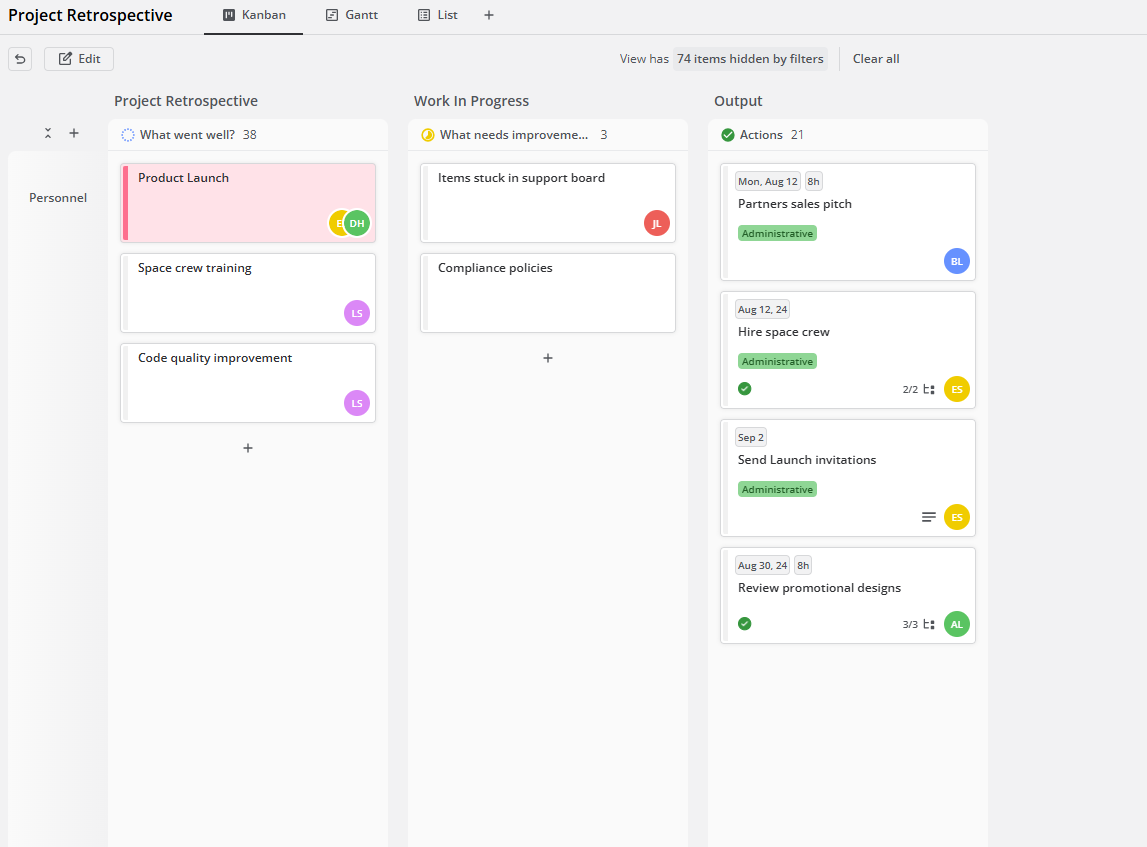
A Project retrospective template helps teams look back on a completed sprint or project to discuss:
- What went well: Highlight successes and effective strategies.
- What needs improvement: Address challenges and areas needing improvement.
- Actions: Decide on steps to enhance future work, assign responsibilities, and set deadlines.
This structured approach ensures continuous improvement in Agile project management.
If you have multiple teams working on the same project, you’ll need to make shared backlogs. It might also help keep your team engaged, as feeling detached is quite common, with around eight out of ten employees feeling disengaged at work.

So, while both a product backlog and a shared one include the same elements, like user stories and priorities, a shared product backlog emphasizes team effort. Teams can see the bigger picture by having a unified list of tasks. This avoids duplicate work and ensures everyone is working towards the same goals.
How to write a product backlog
Writing a product backlog requires a step-by-step process that keeps your project organized and on target. Here’s a quick rundown of how to get it done:
- Define the overall vision and goals for your project.
- Gather all the requirements from stakeholders, users, and team members.
- Break these requirements down into user stories.
- For each user story, list out the specific tasks and sub-tasks needed to complete it.
- Decide which tasks are most critical and need to be done first.
- Assign an effort estimate to each item to understand how long or how much work is needed.
Don’t forget that the product backlog isn’t a one-and-done. Review and update it regularly to include any changes, updated info, or completed tasks. Keep it current so your project can stay on track.
How should the product backlog be ordered?
The product backlog should be ordered based on several key factors to ensure effective project management.
The key step is to prioritize tasks by their value to the user. Focus on what delivers the most benefit or impact. Also, consider the urgency of each task. Some may need immediate attention because of deadlines. It’s also important to make sure the related tasks are handled in the right order to avoid delays.
Balance the value of tasks with their effort and complexity so that high-priority items are manageable and achievable.
Managing backlog size and clutter
A messy backlog can become overwhelming. To keep your backlog clean and manageable, you’ll need to be able to manage its size and reduce clutter. As much as you want to include everything, sometimes just knowing what matters helps.
- Archiving and Pruning: Archiving means moving completed or outdated tasks out of your active backlog, while pruning involves removing tasks that are no longer relevant. Both practices keep your backlog up-to-date.
- Separate Idea Storage: Sometimes, new ideas that come up aren’t ready to be added to the backlog. So, instead of letting them clutter up your current list, use a different list or separate space to store them. Once these ideas are refined and relevant, you can move them into the active backlog.

Keeping your backlog size and clutter in check maintains focus and efficiency. By doing so, you’re always set to create a clear path to achieving your project goals.
Best practices for adding items
Clutter can slow down your team and make it harder to see what’s next. Here’s how to keep everything tidy:
- Controlled Addition of New Items: Don’t add every new idea to your backlog right away. Evaluate each new task based on its value and relevance. Add only those that align with current priorities.
- Regular Grooming Sessions: During these sessions, you and your team have the chance to review and update the backlog. Adjust your priorities as needed, make sure everything’s clear, and remove items you don’t need.
An easy way to organize a backlog is to add items systematically and groom them regularly. Continue learning about the best backlog management practices.
How to prioritize product backlog?
Prioritizing your product backlog involves evaluating and ordering backlog items based on their value and urgency. But how do you know which to prioritize? This can be done in different ways.

Prioritization techniques
Knowing what to prioritize can be tricky. Using the right techniques can simplify the process. Consider these:
- Value vs. effort: This technique assesses each backlog item based on its potential value to the project and the effort required to complete it. Items that offer high value and require low effort should be prioritized first. This maximizes the return on effort and focuses on quick wins.
- MoSCoW method: Categorizes backlog items into four groups: Must Have, Should Have, Could Have, and Won’t Have. This clearly defines what’s essential and what can be put off for now. Prioritize the Must Have items first since they’re the most critical.
- Kano model: Divides items into categories like Basic Needs, Performance Needs, and Excitement Needs. To decide if a feature is strategic, product teams can weigh its satisfaction potential against its cost to implement.
By focusing on value, urgency, and customer satisfaction, you make sure the important tasks get done first and nothing’s left behind.
Prioritization frameworks
For a more structured approach, use a prioritization framework. So, while you can use prioritization techniques to assess and rank your tasks, a prioritization framework gives you a structured model and scoring system for ordering your backlog. Here are some popular ones:
- RICE Framework: This framework is great for putting numbers on big ideas. Each backlog item gets a score based on Reach, Impact, Confidence, and Effort. Reach measures how many people will benefit from the item. Impact evaluates how much it will affect them. Confidence measures how sure you are about the estimates and results. Effort is how much it takes to finish the item.
- Weighted Shortest Job First (WSJF): Prioritizes backlog items based on their Cost of Delay and job size. The Cost of Delay is the impact of not completing a task, and job size is the effort required. By dividing the Cost of Delay by the job size, you can prioritize tasks with the highest value-to-effort ratio.
- Value vs. Complexity Matrix: This plots backlog items on a matrix based on their value and complexity. Items with high value and low complexity should be prioritized, as they offer significant benefits with less effort. Likewise, low-value, high-complexity items can be revisited later.
Prioritizing your product backlog can give you much-needed clarity and consistency in deciding which tasks should be prioritized, helping you manage your backlog more effectively.
Effective product backlog template to get you started
Getting your product backlog right is like having the ideal equipment for your project. A well-organized backlog makes your workflow smoother so you can thrive.For a great start, check out Teamhood’s free online product backlog software. It’s designed to help you manage and organize your backlog efficiently; a powerful tool with all the features you need. Work towards Agile success today—all in one place.
Frequently asked questions
What is Product Backlog Refinement?
Product backlog refinement is essentially backlog grooming. This is an ongoing process that keeps your backlog in top shape. During refinement, you revisit the backlog to clarify details, adjust priorities, and update estimates.
Regularly refining your backlog helps avoid issues like having too many low-priority tasks or requirements that are unclear. This process needs the Product Owner, the development team, and other stakeholders to work together to keep everything aligned and focused on the project’s goals.
Who is accountable for ordering the product backlog?
As the Product Owner prepares the product backlog, they are also in charge of putting it in order. This role also involves deciding which tasks are most important and should be tackled first.
To achieve this, they should work closely with everyone involved to gather input and make the right decisions. Communicating your priorities clearly to the team helps everyone stay focused on what needs to be done.