Software Development Project Management in 2026


Project management is a crucial component in the rapidly changing and constantly evolving field of software development.
It provides the necessary direction to turn abstract concepts into tangible, top-notch products, guaranteeing that projects remain on track, within budget, and satisfy stakeholders’ expectations. Thus, a project manager is critical in running the show and ensuring project success.
To help project managers manage everything without letting anything slip through the cracks, we have created this comprehensive guide, which covers everything you should know for successful software development project management.
Let’s begin.
What is Software Development Project Management?
Software development project management (SDPM) is the application of project management principles to the planning, execution, and monitoring of software development projects.
The SDPM process is the art of efficiently organizing and managing resources, people, and activities involved in completing a software project within budget, on project schedule, and with the desired quality.
It is a crucial component of software development, as it guarantees that projects are completed successfully and that the end-user’s needs are met.
Roles & Responsibilities of Software Development Project Manager
A software development project manager plays a pivotal role in completing software projects. They are responsible for overseeing all aspects of the project success factors, from planning and execution to monitoring and closure. Here’s a comprehensive overview of the roles and responsibilities of a software development project manager:
1. Project Planning and Scope Definition

When embarking on a project, setting clear goals and expectations is crucial to establishing a solid foundation. This initial step is key in preventing scope creep and ensuring all team members work towards the same objectives. Defining these goals upfront also allows for identifying potential risks and implementing early mitigation strategies. Effective collaboration is vital while working with distributed teams, such as software developers from Mexico, QA engineers from Poland, designers from India, etc.
- Define project deliverables, features, and functionalities
- Develop a detailed project plan with tasks, timelines, resources, and risks
- Determine budget constraints and allocate resources efficiently
2. Team Management and Communication

The project manager must create a productive and collaborative team environment. They need to build and manage a well-skilled team for work efficiency. They should address performance issues quickly, maintain efficiency, and ensure transparency and clear communication to unlock creativity and drive innovation.
- Recruit and manage a skilled team.
- Establish clear communication channels and protocols
- Monitor team performance and resolve conflicts.
3. Project Execution and Monitoring

The project manager guides the team through each task, addressing any challenges or obstacles that arise. They closely track progress against the plan, taking corrective actions to keep the project on track. The project manager minimizes disruptions and delays by proactively identifying and mitigating risks, ensuring a smooth and efficient workflow.
- Guide team through execution and addressing challenges such as nearshore software development
- Monitor progress against the plan and take corrective actions
- Identify and mitigate potential risks early on
4. Quality Assurance and Stakeholder Management
Alongside execution, the project manager focuses on quality assurance and stakeholder management. They implement procedures to guarantee the product meets the required standards and delivers value to primary stakeholders.
- Ensure product meets quality standards and stakeholder expectations
- Communicate progress, risks, and issues transparently
- Collect and incorporate stakeholder feedback
5. Project Documentation and Closure
The project manager navigates project documentation and closure. The team meticulously documents all decisions, processes, and deliverables, creating a valuable knowledge base for future reference. The project’s success is evaluated against its objectives, providing insights for continuous improvement.
- Document decisions, processes, and deliverables
- Evaluate project success against objectives and share insights
- Ensure a smooth handover to the next phase
In addition to these core responsibilities, software project managers may also be involved in tasks such as:
- Selecting and implementing project management software.
- Discussing contracts and agreements with third-party service providers and vendors.
- Managing project budget and expenses.
- Representing the project to stakeholders and senior management.
6 Phases of Software Development Project Lifecycle
1. Initiation
The initiation phase is the first phase of every project’s lifecycle. It involves identifying the need for the software, defining the project’s goals and objectives, and securing initial approval from stakeholders.
Key activities:
- Identify the need for the software
- Define project goals and objectives
- Secure stakeholder approval
- Develop a high-level project plan
2. Planning
The planning phase is where the project manager creates a detailed project plan that outlines all the tasks, timelines, resources, and potential risks. The project plan should be clear, concise, and easy to follow.
Key activities:
- Define project scope and deliverables
- Create a detailed task list
- Estimate task durations and resource requirements
- Identify potential risks and mitigation strategies
- Develop a communication plan
3. Designing
The software design phase involves creating a detailed technical plan defining the system architecture, user interface (UI), and database schema. Stakeholders then review the designs and their approval is required before moving the project to the development phase.
Key activities:
- Develop system architecture diagrams
- Design user interface (UI) mockups
- Design database schema
- Define technical specifications
4. Development
The development phase involves the actual coding and implementation of the software. This involves writing code, unit testing, and integrating different modules. The development team must work closely with the design team to ensure the software meets the requirements. Partnering with a IT services provider, like Charter Global, can enhance this process, ensuring that all software functionalities are thoroughly developed to meet both quality and performance standards.
Key activities:
- Write code
- Conduct unit testing
- Integrate modules
- Conduct system testing
5. Testing
The testing phase is crucial for ensuring the quality of the software. This involves conducting various types of testing, such as unit testing, integration testing, system testing, and user acceptance testing. Partnering with a dedicated testing services provider can enhance this process, ensuring that all aspects of software functionality are thoroughly evaluated to meet both quality and performance standards.
The testing teams use a variety of QA automation tools to identify bugs or defects, which the development team then fixes. Once everything is fixed and working properly, the product is deployed to production.
Key activities:
- Develop test plans and test cases
- Conduct unit testing
- Conduct integration testing
- Conduct system testing
- Conduct user acceptance testing
6. Implementation
The implementation phase involves deploying the software to production and providing ongoing maintenance and support. This includes creating deployment plans, fixing bugs, and releasing new features. The implementation team works closely with the operations team to ensure the software is deployed smoothly and efficiently.
Key activities:
- Prepare deployment plan
- Deploy software to production
- Provide ongoing maintenance and support
- Monitor system performance
- Release new features
Common Software Project Management Methodologies
Here is a brief overview of 4 most commonly used software project management methodologies:
1. Kanban

Kanban is an agile-based project management methodology that visualizes the process by utilizing boards with columns representing different work stages.
Tasks are shown as cards on a Kanban board and moved through the columns as they progress. Most teams start with simple columns such as Todo, Doing, and Done and then evolve their boards more complexly. Each team customizes and adapts their boards to replicate their process as accurately as possible.
Kanban is a flexible method that emphasizes regular meetings to review progress and priorities. This allows quick reactions to changes and shorter task delivery times. However, Kanban primarily focuses on task execution and lacks processes for dependency management and overall project scope.
Key Characteristics:
- Visual Boards
- Card based workflow
- Work In Progress Limits
- Continuous Flow
- Pull system
- Collaboration
- Feedback loops
- Focus on value delivery
2. Scrum
Scrum is a popular agile framework that is based on three roles: the product owner, the Scrum master, and the development team.
The product owner is responsible for defining the product backlog, which is a prioritized list of features and requirements. The Scrum master is responsible for facilitating the Scrum process and removing any impediments that prevent the team from working effectively. These scrum masters are certified professionals and they have the skills to properly guide the team. The development team is responsible for developing and delivering the software.
The framework promotes transparency, adaptation, and continuous improvement. Scrum is well-suited for projects where requirements are expected to change or evolve, enabling teams to deliver incremental value and effectively respond to shifting priorities.
Key Characteristics:
- Three roles: product owner, Scrum master, development team
- Product Backlog
- Sprints
- Daily standup meetings
- Sprint planning meetings
- Sprint review meetings
- Sprint retrospective meetings
3. Waterfall
Waterfall is a traditional and linear project management methodology in which each phase must be completed before proceeding to the next. It follows a sequential order: initiation, planning, design, implementation, testing, and maintenance.
Waterfall is a rigid collaborative project management approach with well-defined stages. It works well for projects with stable requirements and minimal change. However, it is not suitable for projects with evolving requirements and depend on constant feedback from stakeholders, which can come in the later development phases.
Key characteristics:
- Sequential approach
- Distinct phases
- Fixed scope
- Well-defined requirements
- Thorough documentation
4. Hybrid
When planning a project, you might find that more than one methodology seems suitable for your project. This is where the hybrid methodology comes into play.
It is a project management technique that involves planning high-level project phases using the waterfall method while carrying out the actual tasks using the agile methodology. You can integrate Agile and Waterfall or Scrum and Kanban into a single one to create a customized approach tailored to the specific needs of a software development project.
This allows teams to leverage the strengths of different methodologies while mitigating their weaknesses, resulting in a flexible and adaptable solution for project success. However, obtaining this combination can be a little complex.
Key characteristics:
- Flexible and adaptable
- Phased approach
- Balance of structure and agility
- Emphasis on metrics and measurement
- Continuous improvement
These are just a few of the many different software development project management methodologies. The best methodology for a particular project will depend on many factors, such as the project’s size, complexity, and the team’s experience.
Best Tools for Software Development Project Management
1. Teamhood

Teamhood is an intuitive and highly visual project management platform. It provides an easy-to-use interface that enables you to coordinate your efforts across the organization. With Teamhood, you can effortlessly create and replicate custom workflows for all your teams, manage resources across multiple projects, and track time and budget to ensure that all tasks are completed within the set parameters.
This tool suits teams of all sizes requiring a powerful project management system to monitor project progress, identify bottlenecks, and enhance productivity. Teamhood also provides various support resources, such as a knowledge base, a community forum, email support, and live chat support, ensuring seamless onboarding and efficient resolution of problems faced while using the platform.
Key Features:
- Customizable resource/workload management
- Integrated time tracking and budgeting
- Collaboration and document management
- Advanced Kanban board
- Flexible structure to represent your process
2. Jira

Jira is a popular tool among software development teams due to its wide range of features that cover all aspects of the software development process. It helps with planning and tracking tasks, as well as managing issues and bugs.
The tool offers a user-friendly interface that makes it easy to get started with project management. Its drag-and-drop functionality simplifies task organization, and clear task descriptions provide a straightforward understanding of project requirements. Jira’s extensive customization options also allow teams to tailor the tool to their specific needs and preferences.
Key Features:
- Comprehensive Project Management Capabilities
- Visual Task Management and Progress Tracking
- Powerful Issue Tracking and Bug Resolution
- Support for Agile Methodologies
3. Asana

Asana is a cloud-based project management tool with an intuitive interface, versatile features, and powerful integrations that suit teams of all sizes.
Asana is flexible and can support Agile and Scrum methodologies for sprint planning, bug tracking, product launches, work requests, roadmaps, feedback, and tracking task iterations. With Asana, you can match the tool to your work process rather than vice versa.
Key Feature:
- Powerful Kanban boards and Calendar views
- Effective workload management and resource allocation tools
- Seamless file sharing and collaboration capabilities
- Real-time notifications and actionable insights
- Customization options to adapt to various workflows
4. Teamwork
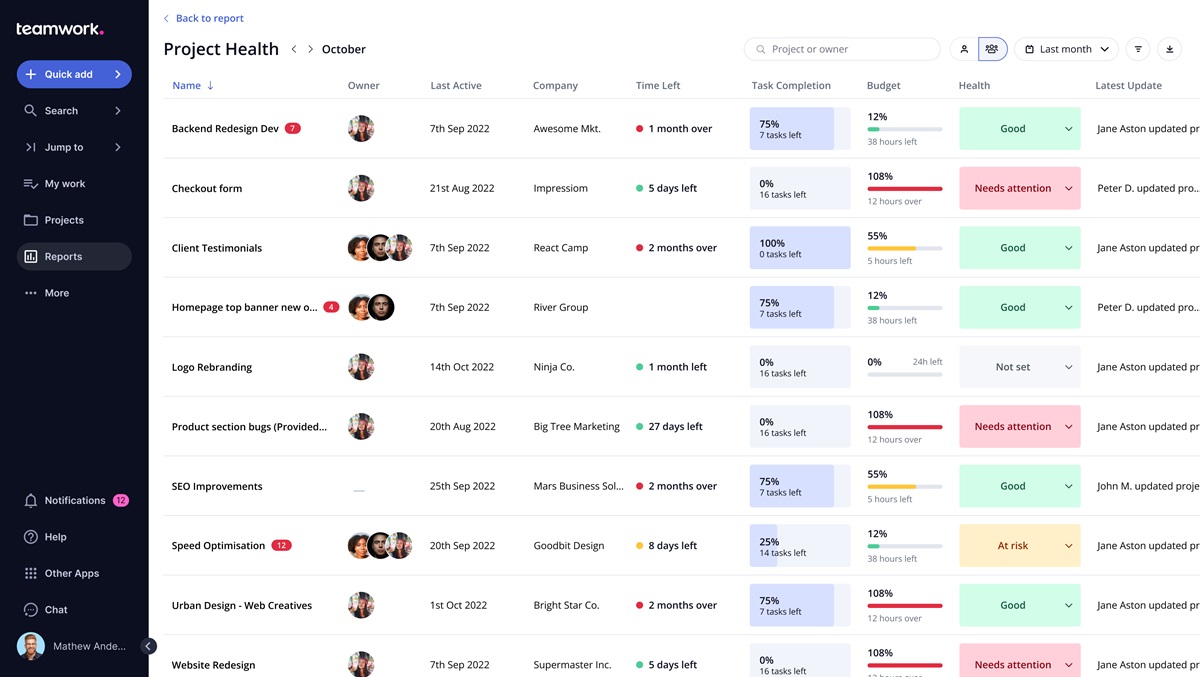
Teamwork lets you keep track of all project-related communications, files, assets, and downloads in one place. It ensures that all team members are on the same page and can access the same information.
Teamwork informs team members through real-time notifications about task updates, deadlines, and assigned tasks, promoting timely responses and proactive collaboration.
Key Features:
- Task assignment & role management
- Gantt charts to monitor & adjust project timelines
- Real-time collaboration and communication
- Project budgeting & billing
- 80+ software integrations
Key To Successful Software Development Project Management
The key to success lies in thoroughly understanding your project’s requirements and choosing the right methodology. Then, bring together a strong team, establish clear communication, and prepare a realistic plan by assessing all risks and devising a plan to mitigate them.
Monitor your project and team’s progress closely and take immediate action if things go wrong. Adopt the right tools to ensure smooth functioning, coordination, and quality of your product.
Additional resources:
- 2025 Guide to manager salaries
- Project management dashboard examples
- Choosing on-premise project management software

Frequently asked questions
How to manage software development projects?
For successful software projects, first, set clear goals and limits. Then, build a skilled team and select a method, like Agile or Scrum. Next, outline a plan with deadlines, tasks, and risks. Regularly check progress using tools with the tools we have mentioned in this post. Also, ensure quality through testing and update stakeholders often. After launch, fix bugs, collect feedback, and improve performance.
What’s an example of software development project management?
An example of software project management is creating a retail app. The project manager first defines the project. Then, they prioritize tasks using Agile. Next, they lead developers, designers, and testers. They track progress in Teamhood and hold regular feedback meetings. After launch, the manager ensures support, fixes bugs, and gathers feedback for improvements.
How does software project management differ from software development project management?
Software project management oversees planning, resources, scheduling, and communication. It ensures projects stay on track, on time, and within budget. Meanwhile, software development project management focuses on coding, testing, and deployment. It deals with the technical aspects of building software. In short, the former covers a broader scope, while the latter zeroes in on software creation and technical execution.